




Pros
- Excellent overall performance
- Stylish looks
- Mighty 4K gaming
- Runs quietly
Cons
- Ever-confusing pricing
- Subpar storage speeds
- Poor dust protection
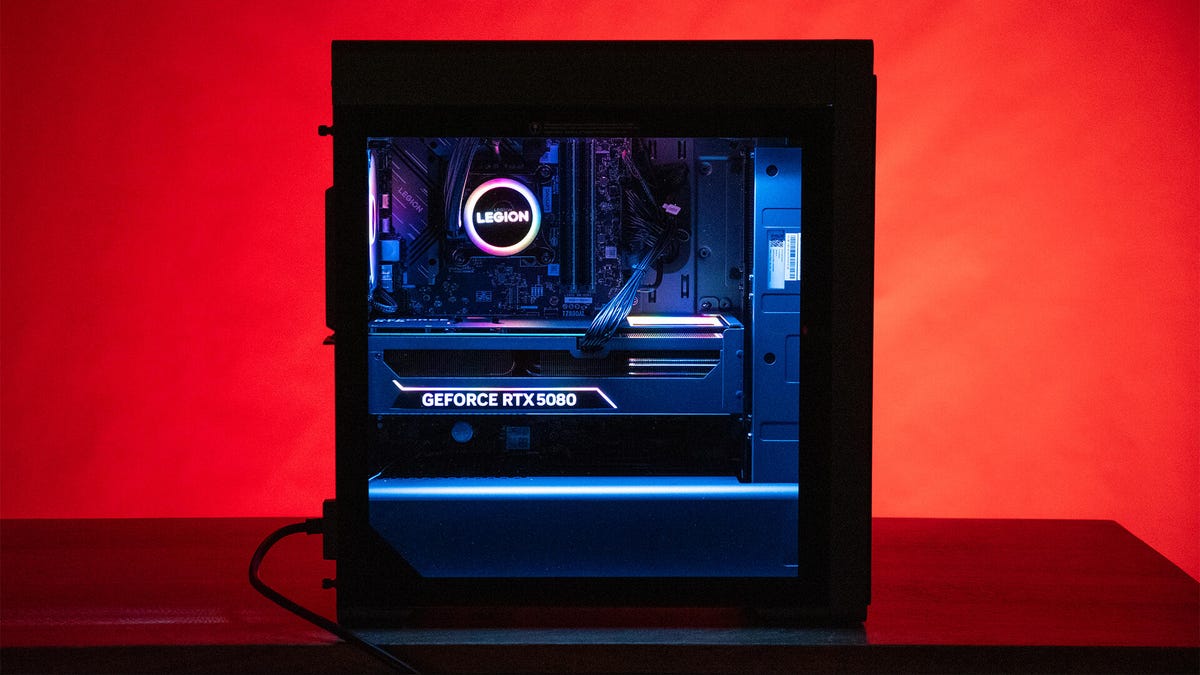
The Legion Tower 7i Gen 10 (34IAS10) is a good-looking and powerful gaming PC, and Lenovo has a knack for making sure its systems can deliver highly competitive performance against similarly configured PCs. In several respects, that means the Legion Tower 7i Gen 10 can go toe-to-toe with even brilliantly designed systems such as the Velocity Micro Raptor Z95A.
The downside is that Lenovo’s nebulous pricing leaves value a bit of a question mark. On one day, the Legion Tower 7i might dramatically undercut competing PCs; on another, it could be just as expensive. When prices are on the higher end of their range, the system’s drawbacks stand out more. For example, Lenovo’s dust filtration is borderline nonexistent, it uses the dullest memory modules available, upgrades are possible but likely challenging for inexperienced builders and Lenovo’s choice of CPU holds it back significantly with 1080p gaming. In all, though, it’s quite a compelling gaming PC.
Lenovo Legion Tower 7i Gen 10 (34IAS10)
| Price as reviewed | $4,749 |
|---|---|
| Size | 42 liter (18.8×8.3×16.3 in/478x211x415 mm) |
| Motherboard | Lenovo Z890 ATX |
| CPU | 3.7GHz Intel Core Ultra 9 285K |
| Memory | 64GB DDR5-5600 |
| Graphics | Nvidia GeForce RTX 5080 |
| Storage | 1TB NVMe M.2 PCIe Gen 4 SSD (boot) (WD SN740), 1TB NVMe M.2 PCIe Gen 4 SSD (WD SN740) |
| Networking | 2.5GbE, Intel Wi-Fi 6E AX211 802.11AX, Bluetooth 5.3 |
| Connections | USB 3.2 Gen 1 Type-A (x2 rear, x4 rear), USB 2.0 Type-A (x2 front, x1 rear), USB 3.2 Gen 2 Type-A (x1 rear), Thunderbolt 4 (x1 rear), 3.5mm audio connector (x1 front, x5 rear), SPDIF, 2.5Gb Ethernet, HDMI 2.1 (x1 on motherboard, x1 on GPU), DisplayPort 1.4a (x1 on motherboard, x3 on GPU) |
| Operating system | Windows 11 Home |
Lenovo continues to be a true challenge to pin down on pricing. Our review unit has the specifications above, but is not available configured as such from Lenovo. The closest option includes all of the above, but with just 32GB of memory. At the time of this review, that version isn’t on sale and has a regular price of $4,550. However, Lenovo regularly cycles through discounts and will list an “Est. Value” price with a sale price alongside it, which can be vastly different than the everyday price.
Making Lenovo’s pricing even more confusing, you’ll find similar configurations from other retailers, including Amazon and Best Buy, with their own regular and sale prices. It’s not that this is unusual, but it requires some patience and willingness to pay close attention to the components you want and the pricing across retailers in order to get the best deal. Basically, it’s best not to rush into buying because a better price could be around the corner.
Currently, Lenovo offers additional configurations starting at $3,770. That’s significantly more than where it was earlier in the year thanks to RAM, storage and GPU shortages. The base combines an Intel Core Ultra 7 285K, RTX 5070 Ti, 32 gigabytes of memory and 1 terabyte of storage. The next step up actually downgrades to an Intel Core Ultra 7 265K CPU, but bumps the GPU up to an RTX 5080 plus 2TB of storage. The top-tier configuration includes all the same specifications as our test system, except an RTX 5090 and 1,200-watt power supply instead for an eye-watering $6,900.
Solid overall, but room for improvement in competitive gaming
With the powerful hardware it packs, it shouldn’t come as a surprise that the Legion Tower 7i Gen 10 is wonderfully fast. It scored excellent marks in Geekbench 6 and Cinebench R24 CPU testing, with its Intel Core Ultra 9 285K going toe-to-toe with the AMD Ryzen 9 9950X3D. Lenovo’s 360-millimeter liquid cooling system handles the temps of the CPU well, too. Even when the system was running a benchmark, the fans remained a quiet hum.
This Lenovo keeps cool under pressure.
The Tower 7i makes the most of its RTX 5080, delivering strong benchmark results and proving quite capable of 4K gameplay. It ran Shadow of the Tomb Raider with an average of 154 frames per second at 4K using the Highest setting without DLSS. With Guardians of the Galaxy at 4K High settings, it managed 178 fps. As good as the CPU is in general, when it comes to gaming, it holds the system back a little. AMD’s Ryzen 9 9950X3D and even Ryzen 7 9800X3D can give systems with those CPUs an edge in gaming performance. The Velocity Micro Raptor Z95A has an AMD Ryzen 7 9800X3D and RTX 5080, and despite the CPU falling below the Intel Core Ultra 9 285K general benchmarks, it helped the system earn better average framerates in games. In Shadow of the Tomb Raider, for example, the Velocity Micro zoomed ahead with an average of 362 fps, and it even maintained a minor lead in 4K.
If you’re a competitive gamer after the fastest refresh rates, even if that means potentially using lower resolutions, the AMD advantage is worthy of consideration. Most gamers considering an RTX 5080-powered system likely want higher resolutions, and in that case, the CPU makes less of a difference.
Good port assortment in the rear.
Though most performance is excellent, Lenovo skimped a little on storage compared to its competitors. The Legion Tower 7i only achieved a 1,819-point score in the 3DMark Storage Benchmark, falling well below the drives loaded into rivals such as the Corsair Vengeance A7500 Air, Alienware Area-51 and Velocity Micro Raptor Z95A. Lenovo included two of the same drives in this system and it’s simply an underperformer. In CrystalDiskMark 9, it managed just 5,278 megabytes per second read speeds and 4,874Mbps write speeds. That’s not even coming close to taking full advantage of the PCIe 4.0×4 bandwidth, let alone the PCIe 5.0 bandwidth available in the M.2 slot linked directly to the CPU (which Lenovo fortunately didn’t populate, so you can install your own high-quality drive if desired).
Stylishly done, but not always smartly
The earlier Legion Tower 7i Gen 8 had a very stylish look, and little has changed with this new Gen 10 version. Its appearance is almost identical, with a dark, gun-smoke case and a bold 3D front grille and multilayered grilles on top. But Lenovo made a nice change in swapping one of the four front USB-A ports for USB-C.
There are some ports on the top at the front of the PC, too.
One thing Lenovo regretfully didn’t correct from the earlier gen was filtration. The fancy grilles may help the system keep out long hairs and larger debris, but they’re wide open to all sorts of dust and fine particles. That means the system will almost surely collect a ton of dust over time. Perhaps worse still, any dust coming in through the front is going to blow straight into the 360mm radiator, where the tight fin spacing can make lead to extreme clogging (having recently helped a friend clean the dust out of his PC, I can tell you it’s no joke).
Beyond that, the rest of the system is decent. Lenovo does great work with the RGB lighting here. It has RGB rainbow lighting on the front Legion logo, all six case fans, the CPU water pump and the graphics card cooling shroud and backplate are synced. The memory modules are bare without so much as the most basic heat spreader, which holds back the aesthetics slightly, but the cable management is tidy.
Like lights? The Legion tower has plenty.
Upgradability is modest for a system this size. There are two extra RAM slots and potential mounting points for 2.5-inch drives, plus a rack with trays for two 3.5-inch drives. Lenovo has prewired SATA data and power cables for at least two extra drives, but space is incredibly cramped behind the motherboard and around the power supply, so actually maneuvering the cables will be difficult. The 850-watt 80 Plus Gold power supply appears to have some modularity, but again, because of the tight space behind it, taking advantage of that would require more than simply plugging in an extra cable.
On the motherboard, there’s an extra PCIex16 slot, but it butts right up against the graphics card’s intake fans, limiting your options for add-in cards. Lenovo also opted to install its M.2 drives underneath the graphics card, leaving open the PCIe 5.0×4 slot with a direct link to the CPU. It’s an odd choice, but since Lenovo used such middling storage, it’s nice that it was kept free for installation of a better drive down the line.
Despite how big it is, upgrades and add-ons inside could be tricky.
The system offers solid connectivity. Your I/O options are abundant on both the front and rear, even including a Thunderbolt 4 port on the back. Networking benefits from a 2.5-gigabit Ethernet port and Wi-Fi 6E, which proved fast and stable in my testing, even without visually obvious antennas sticking out of the back of the case (Lenovo has them wired from the motherboard and subtly blended into the design).
Overall, if you can find it at one of its lower prices, the Lenovo Legion Tower 7i Gen 10 performs well and looks great.
Geekbench 6 (single core)
Minisforum AtomMan G7 Ti 2,833Dell Tower Plus 2,935Lenovo Legion Tower 7i Gen 8 3,062Alienware Area-51 3,149Starforge Explorer III Pro 3,205Lenovo Legion Tower 7i Gen 10 3,231Velocity Micro Raptor Z95A 3,303Corsair Vengeance A7500 Air 3,382
Cinebench 2024 CPU (multicore)
Velocity Micro Raptor Z95A 1,321Minisforum AtomMan G7 Ti 1,431Dell Tower Plus 1,810Starforge Explorer III Pro 2,047Lenovo Legion Tower 7i Gen 10 2,290Alienware Area-51 2,313Corsair Vengeance A7500 Air 2,256
Guardians of the Galaxy gaming test (4K)
Alienware Area-51 177Lenovo Legion Tower 7i Gen 10 178Velocity Micro Raptor Z95A 187Starforge Explorer III Pro 196Corsair Vengeance A7500 Air 263
The Rift Breaker CPU (1080p)
Dell Tower Plus 151Lenovo Legion Tower 7i Gen 10 157Alienware Area-51 166Starforge Explorer III Pro 174Lenovo Legion Tower 7i Gen 8 184Corsair Vengeance A7500 Air 254Velocity Micro Raptor Z95A 268
3DMark Speed Way (DX12 Ultimate)
Dell Tower Plus 5,894Lenovo Legion Tower 7i Gen 8 7,425Alienware Area-51 8,717Velocity Micro Raptor Z95A 9,009Lenovo Legion Tower 7i Gen 10 9,012Starforge Explorer III Pro 9,150Corsair Vengeance A7500 Air 14,536
3DMark Fire Strike Ultra
Alienware Area-51 21,463Lenovo Legion Tower 7i Gen 10 21,650Velocity Micro Raptor Z95A 21,665Starforge Explorer III Pro 22,030Corsair Vengeance A7500 Air 33,075
Procyon Stable Diffusion XL
Lenovo Legion Tower 5 Gen 10 2,672Dell Tower Plus 2,846Lenovo Legion Tower 7i Gen 8 3,444Alienware Area-51 3,814Velocity Micro Raptor Z95A 4,257Lenovo Legion Tower 7i Gen 10 4,489Corsair Vengeance A7500 Air 7,144
Configurations
| Alienware Area-51 | Microsoft Windows 11 Pro; 3.7GHz Intel Core Ultra 9 285K; 64GB DDR5-6400; 16GB Nvidia GeForce RTX 5080 graphics; 2TB SSD |
|---|---|
| Dell Tower Plus | Microsoft Windows 11 Home; 3.9GHz Intel Core Ultra 7 265K; 32GB DDR5-5600 RAM; 12GB Nvidia RTX 5070; 1TB NVMe M.2 PCIe Gen 4 SSD |
| Corsair Vengeance A7500 Air | Microsoft Windows 11 Home; 4.4Ghz AMD Ryzen 9 9950X3D; 64GB DDR5-4800 RAM; Nvidia RTX 5090 graphics; 2TB Corsair MP700 Elite (boot drive); 2TB Corsair MP600 Core XT “ |
| Lenovo Legion Tower 7i Gen 8 34IRZ8 | Microsoft Windows 11 Home; 3.2GHz Intel Core i9-14900KF; 32GB DDR5 4,400MHz RAM; 16GB Nvidia RTX 4080 Super graphics; 1TB SSD |
| Minisforum AtomMan G7 Ti | Microsoft Windows 11 Home; 2.2GHz Intel Core i9-14900HX; 32GB DDR5 5,600MHz RAM; 8GB Nvidia RTX 4070 graphics; 1TB SSD |
| Starforge Explorer III Pro | Microsoft Windows 11 Home; 3.9GHz Intel Core Ultra 7 265K; 64GB DDR5-6000; Nvidia RTX 5080 GPU; 2TB NVMe M.2 PCIe Gen 4 SSD |
| Velocity Micro Raptor Z95A | Microsoft Windows 11 Home; 2.5GHz AMD Ryzen 7 9800X3D; 64GB DDR5 RAM; 16GB Nvidia GeForce RTX 5080 graphics; 2TB SSD |
Read the full article here