




Pros
- Premium MacBook look and feel at much lower cost
- 13-inch display not much smaller than Macbook Air’s
- A18 Pro chip is powerful enough to provide fulfilling MacOS experience
- Surprisingly impressive sound from stereo speakers
Cons
- Touch ID costs $100 extra
- Baseline 256GB SSD will fill up fast
- No MagSafe or fast charging
- Smaller battery and shorter battery life than MacBook Air
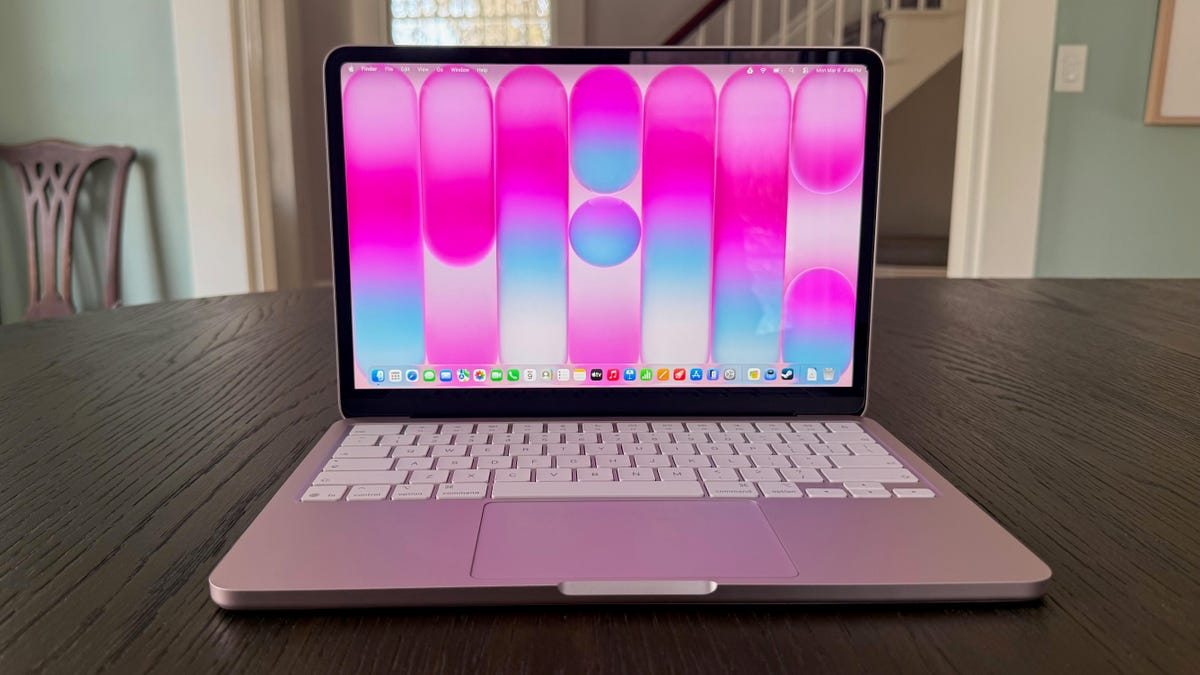
The “Neo” name is intentional. Apple is signaling that it’s going after new users with the MacBook Neo. Namely, those who can’t afford to spend more than $1,000 on a laptop. Plus, parents who, having witnessed the level of attention and care teenagers bring to taking care of and keeping track of their possessions, are willing to spend that kind of money on a laptop for their offspring only with great trepidation. The MacBook Neo is certain to become the first new, non-hand-me-down MacBook for many people.
The MacBook Neo is the perfect first laptop for kids. It’s by far the most affordable MacBook, yet it still offers the same premium design and durability as Apple’s pricier MacBooks. It’s also lightweight and compact, making it easy to take to school, and comes in three fun colors (plus standard silver). The Neo costs the same as the cheapest iPhone and lets parents set their kids up with a phone and laptop combo that works well together, costing only $100 more than the cheapest MacBook Air. And unless your kid is a budding filmmaker or building their first LLM, he or she don’t need the power of an Air or MacBook Pro.
As cute and colorful as it is, the $599 MacBook Neo is more than just a laptop for kids. It’s also equipped to get college students through four years of school, and it makes a great laptop for anyone who wants an extra laptop for kicking back on the couch at night to browse the web, watch a show or movie, perform some light edits on the photos you took earlier in the day on your iPhone and text using all 10 fingers on a keyboard than just two thumbs on your iPhone.
Sure, it’s missing a few features so that Apple could hit the $599 price, but you can address two of the biggest omissions with the lone $100 upgrade that doubles the storage and adds Touch ID. I hope next year’s Neo includes Touch ID in the base model and adds MagSafe charging, but right out of the gate, the first-gen Neo is the most well-rounded $600 laptop around.
Apple MacBook Neo
| Price as reviewed | $599, £599, AU$899 |
|---|---|
| Display size/resolution | 13-inch, 2,480×1,506-pixel LED-backlit IPS display, 500 nits brightness |
| CPU | A18 Pro 6-core CPU (2P, 4E) |
| Memory | 8GB unified memory |
| Graphics | Integrated A18 Pro 5‑core GPU |
| Storage | 256GB SSD |
| Networking | Wi-Fi 6E and Bluetooth 6 |
| Ports | USB 3 (USB-C), USB 2 (USB-C), headphone |
| Operating system | MacOS Tahoe 26.3.1 |
| Weight | 2.7 lbs (1.2 kg) |
The MacBook Neo drops the entry point of an Apple laptop by a whopping $500. The M5 MacBook Air starts at $1,099, and the Neo costs $599. And you still get Apple’s $100 education discount with the Neo, which is nearly double the discount by percentage (17% versus 9%) than the $100 students can save on the Air.
The $599 MacBook Neo features an A18 Pro chip found in the iPhone 16 Pro, 8GB of unified memory and a 256GB SSD. The only upgrade Apple offers on the Neo costs $100 for a 512GB SSD and Touch ID. Most laptop users will benefit from the added storage, and everyone should want Touch ID, making the Neo’s lone upgrade something I would strongly recommend.
The MacBook Neo starts at £599 in the UK and AU$899 in Australia.
Premium MacBook design for less
The MacBook Neo doesn’t look like a $600 laptop. Most laptops at this price feature a mixture of aluminum and plastic, if they’re not made entirely of plastic. Maybe you get an aluminum lid to protect the display, but the keyboard deck and bottom panel are probably plastic. Or if you find one with an all-aluminum design, it’s thin and flimsy, like plastic. There’s none of that with the Neo. It looks and feels like a slightly shrunken-down MacBook Air or Pro.
The Neo forces you to make do with less performance and some missing features compared with the MacBook Air, and I’ll get to those items below, but I need to start with the design and build quality. I can’t believe how similar the MacBook Neo is to its big siblings. Like MacBook Air and Pro models, the Neo has a sturdy, all-aluminum body. It feels just as rigid as a MacBook Air or Pro with the same luxurious look. The Neo doesn’t cheapen the MacBook brand.
The MacBook Neo doesn’t look or feel all that different from a MacBook Air. It’s just a little smaller and a bit more colorful.
The only differences between the Neo’s appearance and the Air’s, other than being a bit more compact and the color choices, are the softer, more rounded edges on the Neo’s lid and the color-matched keyboard. Instead of black keys, the Neo’s match the body’s color. And the two laptops feel the same when you pick them up, both in their smooth, brushed-aluminum surfaces and their overall system weight. Despite being slightly more compact than the MacBook Air, the MacBook Neo is a hair thicker at 0.5 inches (versus the Air at 0.4 inches) and weighs the same at 2.7 pounds.
The Neo’s display bezels are also a bit thicker than the Air’s, but Apple uses the bigger top bezel to hide the webcam; in other words, there’s no notch in the menu bar to house the camera, which makes the thicker bezels more palatable. If the Neo had a webcam notch, then I would have wanted Apple to find a way to thin out the bezels on the Neo and squeeze in the same 13.6-inch display that you get with the MacBook Air — or at least get closer to it in size.
Look ma, no notch!
But without a notch, I’m good with the Neo’s thicker bezels and 13-inch display. In fact, I’m quite pleased with its size after hearing rumors that Apple might follow the recipe of the short-lived 12-inch MacBook from a decade ago and offer something smaller than the MacBook Neo.
The MacBook Neo is built around a 13-inch Liquid Retina display with a 2,480×1,506-pixel resolution. Text and images appear just as sharp as they do on the MacBook Air, which has a 13.6-inch panel with a similar 2,560×1,664-pixel resolution. And it proved to be a bit brighter than the M5 MacBook Air. Both displays are rated for an ample 500 nits of brightness (most budget laptops fall between 300 and 400 nits of brightness, with some as low as 250 nits), but the Neo hit a peak brightness of 518 nits on my display tests using a Spyder X Elite colorimeter. The M5 Air hit its rated brightness on the nose, reaching 500 nits.
The MacBook Neo is based on a 13-inch Liquid Retina display.
The Neo’s color performance is merely mediocre, but people who engage in color-accurate graphics work aren’t the Neo’s audience. In fact, this type of user will probably pass on the Air in favor of the Liquid Retina XDR display that comes with a MacBook Pro. On my tests, the MacBook Neo covered 98% of sRGB, 73% of AdobeRGB and 74% of P3. Compare that with the M5 Air that hit 100% of sRGB, 86% of AdobeRGB and 98% of P3. But again, color performance isn’t likely high on a budget laptop shopper’s priority list. Most people interested in the Neo will skip right over this paragraph and want to get to the features that the Neo has and doesn’t have. So, let’s get to it.
Missing features I miss
Apple sent me the base $599 model that has a 256GB SSD and a lock button in the top right of the keyboard, where I desperately want a Touch ID sensor. You can add Touch ID for an extra $100, which also doubles the storage to a 512GB SSD. I’d spend $100 just to get Touch ID because I use it so frequently, not just to get past the MacOS lock screen but to access my various online accounts and make online purchases. I’d spend a nickel every time I could use Touch ID instead of having to remember and type in a password, and it would pay for itself in a few months. (I would conservatively estimate I use Touch ID 20 times a day, so I’d have 2,000 nickels in the till after only 100 days.)
I would also gladly accept the greater storage that comes with the Neo’s Touch ID upgrade. Most users will quickly fill the 256GB SSD to capacity. After logging in with my Apple ID, I had only 145GB of free storage on the Neo’s 256GB drive, with roughly 25GB allocated each to Messages, Photos, Applications and MacOS Tahoe itself. The added storage space and Touch ID are well worth the added $100.
It’ll cost you $100 to turn that lock button into a Touch ID sensor.
The feature I miss most that you can’t add to the MacBook Neo is MagSafe charging. I like the satisfying snap when I connect the MagSafe cable to my MacBook, and the peace of mind that comes with knowing the cable will release with ease and won’t pull my MacBook to the floor if I trip over the cord.
The Neo’s battery is much smaller than the Air’s. It has a 36.5-watt-hour battery compared with the Air’s bigger 53.8-watt-hour battery. Given how close the two laptops are in size, I’m surprised by the difference in battery capacity. The Neo’s battery life will still get you through most days on a single charge, but, as you’ll see below, it’s hours shorter than the M5 MacBook Air. It’s also more than 2 hours shorter than the M1 MacBook Air, which had an even bigger battery (58.2 watt hours) than the latest Air.
The MacBook Neo includes a 20-watt charger that does not support fast charging.
The Neo offers USB-C charging, which doesn’t snap into place or disconnect as easily. And it doesn’t charge as fast. The Neo comes with a 20-watt power adapter that doesn’t charge the battery as fast as even the standard 40- to 60-watt dynamic charger that comes with the M5 Air. The Neo took about an hour to charge the battery to 50%, which the M5 Air did in approximately half that time. The Neo took 1 hour and 45 minutes to reach 80% and 2.5 hours to reach full charge.
One last nitpick with the Neo’s charging setup: The power cord is 20 inches shorter than the Air’s, which might cramp your style if you need to charge in a coffee shop or lunchroom and aren’t sitting right next to an outlet. At least the Neo’s power cord is braided like the Air’s, so it doesn’t tangle as easily, but it’s not color-matched. My blush Neo has a white power cord. Also, both ports are on the left side, so you lose some charging flexibility there as well.
Missing features I can live without
There are other features that go missing on the MacBook Neo that you get with the Air that I’m willing to concede to shave $500 off the cost.
First, let’s talk about the 8GB of RAM. That’s half the MacBook Air’s memory, and you can’t upgrade it. For my needs of using Google Docs and Sheets with dozens of other open tabs in Chrome next to the ChatGPT Atlas browser, doing some light photo editing in Photos, keeping Messages open for responding to texts using the keyboard instead of grabbing my iPhone and streaming music in the Spotify app, the 8GB suffices. I even did some of my normal edits in iMovie, and that workflow went smoothly, too.
I’ve had an entirely pleasant MacOS experience on the Neo the past few days and rarely saw the MacOS spinning beachball. I haven’t missed having 16GB of memory, but if you need a MacBook for more demanding graphics work, then you’ll want to step up to at least a MacBook Air for its added memory as well as the additional CPU and GPU cores you get with an M5 processor compared with the Neo’s A18 Pro chip. More on Neo’s performance in the next section.
When I saw that the MacBook Neo has a mechanical trackpad instead of the Force Touch trackpad you get with the Air, I was certain I’d pine for the Force Touch’s haptic feedback. But the Neo’s mechanical touchpad is surprisingly awesome. It offers a consistent click response across its entire surface. There’s not even a hint of the diving-board effect that plagues most mechanical keyboards; a click on the top edge feels no different than a click on the bottom edge of the Neo’s trackpad.
The MacBook Neo’s keys are color-matched but not backlit.
I was also ready to complain about the lack of keyboard backlighting, but it turns out the color-matched keys aren’t just for cosmetic reasons. At least with the blush MacBook Neo that Apple sent me, the dark gray key icons against the light pink color of the keys themselves make the keys stay more visible in low light than the MacBook Air’s black keys with white icons. (The citrus, indigo and silver models appear to have similarly light-colored keys.) Especially if you’re composing an email, writing a document, or working on a spreadsheet with a white background, the display’s light provides enough illumination to see the keys.
The Neo has two speakers, but they sound nearly as good as the MacBook Air’s quad-speaker array. I think speaker positioning has much to do with the Neo’s impressive stereo sound, plus the fact that they support Apple’s spatial audio. The Neo has side-firing speakers located near the front of the laptop, which puts the sound closer to your ears than with the Air, whose speakers fire from the laptop’s back edge at the display hinge. The Neo’s sound isn’t quite as full as the Air’s, but it’s better than that of any other sub-$1,000 laptop I’ve tested.
The Neo lacks Thunderbolt 4 ports, but I transfer most of my files via the cloud, so I don’t miss the faster 40Gbps speed. The Neo has a pair of USB-C ports. They’re unmarked, but you won’t need to remember that the one further back is USB 3 (10Gbps) and the front one is USB 2 (480Mbps) because MacOS alerts you to use the other port if you connect an external display or storage drive to the USB 2 port.
The MacBook Neo’s three ports (two USB-C and a headphone jack) are all located on the laptop’s left side.
The Neo lacks Apple’s N1 chip, which you get with the M5 MacBook Air for Wi-Fi 7. Like most people I know, I haven’t upgraded to a Wi-Fi 7 router, so I’m OK with the Neo’s Wi-Fi 6E networking.
The laptop also has a 1080p webcam, but it doesn’t support Center Stage or Desk View. I have never felt the need to use Desk View on my MacBook Pro, and I remain fairly stationary during video calls, so I don’t miss the Center Stage feature that keeps you centered in the frame.
Lastly, you miss out on Apple’s True Tone technology with the Neo. It uses ambient light sensors to adjust the display’s white balance so text and images look more natural and accurate. I’ve been using the MacBook Neo for only four days, but so far I haven’t found myself missing True Tone.
MacBook Neo performance
Inside, the biggest change between the Neo and other MacBooks is the processor. The Neo doesn’t use one of Apple’s M-series processors but an iPhone chip — the A18 Pro that was introduced with the iPhone 16 Pro in 2024. The A18 Pro has a six-core CPU (two performance cores and four efficiency cores) and a five-core GPU. Compare that with the M5 chip that powers the new MacBook Air: The M5 has a 10-core CPU (four performance cores, which Apple now calls “super cores,” and six efficiency cores) and either an eight- or 10-core GPU. The Neo’s core count is closer to the M1 MacBook Air’s from 2020, but the older M1 Air has more, with eight CPU cores and seven GPU cores.
Those extra cores show up in our multicore tests for Geekbench 6 and Cinebench 2024, where the Neo finished near or at the back of the pack. It was able to edge the M1 Air on the multicore test of Geekbench 6, but its multicore score on Cinebench 2024 was well off the pace of the other MacBooks, as well as two budget Windows laptops in the Acer Aspire 14 AI and HP OmniBook 5.
The indigo color is a deep, dark blue.
The Neo was more competitive on the single-core versions of these two tests, where its scores were on par with those of the M3 MacBook Air. This greater single-core performance shows up in everyday activities like opening apps, switching windows and basic productivity tasks like emailing and word processing, where these simple actions feel snappy and responsive.
Since the MacBook Neo’s low price puts it in competition with Chromebooks, I ran a couple of our Chromebook benchmarks on it and also created a second set of Geekbench 6 charts for the Neo so you can see its scores against those of Chromebooks. Spoiler: The Neo dusted its Chromebook competition.
For traditionalists on a budget, the MacBook Neo comes in standard silver.
The Neo’s battery life was also better than many Chromebooks we’ve tested, but it’s still several hours shorter than that of other MacBooks. It lasted nearly 13.5 hours in our YouTube streaming battery-drain test, which was about 3.5 hours shorter than the M5 MacBook Air did on the same test. It was also more than 2 hours shorter than the M1 MacBook Air’s time. We have also seen much longer runtimes from Windows laptops based on Qualcomm’s Snapdragon X series processors and Intel’s Lunar Lake and Panther Lake chips.
While 13.5 hours should be enough to last through a long day at school or work, it doesn’t give you the carefree ability to leave your MacBook unplugged for a couple of days at a time. With the MacBook Neo, you’ll probably want to remember to charge it each night.
Should I buy a MacBook Neo?
Without question, I would have purchased a MacBook Neo instead of a more expensive MacBook Air for each of my kids had it been an option a few years ago when they were in high school. (I’ve since had to buy my daughter a second Air in college after her first Air died, which makes the Neo an even better bargain when you factor in the chance of needing to buy a replacement.) My kids are generally gender-conforming, so I could see my daughter picking the blush model and my son going for indigo, while I sat back, hoping that one of them would choose citrus, my favorite color among the Neo’s four choices.
I think I like citrus best.
The MacBook Neo is easily the best laptop for school use, especially if you or the student you’re buying for already has an iPhone. The two work seamlessly together. Given the convenience and security that Touch ID provides, however, I’d view Apple’s $100 educational discount as a way to add Touch ID (along with more storage) for free instead of lowering the price of the base model.
For those out of school and who want a cheap, portable laptop for casual use around the house or for a job that doesn’t require demanding creative, scientific or AI tasks, the MacBook Neo makes a lot of sense for the money. You won’t find a better-designed laptop at this price.
MacBook Neo vs. MacBook Air: Benchmark test results
The review process for laptops, desktops, tablets and other computerlike devices consists of two parts: performance testing under controlled conditions in the CNET Labs and extensive hands-on use by our expert reviewers. This includes evaluating a device’s aesthetics, ergonomics and features. A final review verdict is a combination of both objective and subjective judgments.
The list of benchmarking software we use changes over time as the devices we test evolve. The most important core tests we’re currently running on every compatible computer include Primate Labs Geekbench 6, Cinebench R23, PCMark 10 and 3DMark Fire Strike Ultra.
A more detailed description of each benchmark and how we use it can be found on our How We Test Computers page.
Geekbench 6 CPU (multi-core)
Apple MacBook Pro 14-inch M5 2025 17946Apple MacBook Air 13-inch M5 2026 16890Apple MacBook Pro 14-inch M4 2024 15134Apple MacBook Air 13-inch M4 2025 15049Apple MacBook Air 15-inch M4 2025 14942Apple MacBook Air 13-inch M3 2024 12063Apple MacBook Air 15-inch M3 2024 12034HP OmniBook 5 14 11379Asus Zenbook A14 10632Apple MacBook Air 15-inch M2 2023 9859Apple MacBook Neo 8958Apple MacBook Air 13-inch M1 2020 8710
Geekbench 6 CPU (single-core)
Apple MacBook Pro 14-inch M5 2025 4263Apple MacBook Air 13-inch M5 2026 4148Apple MacBook Air 13-inch M4 2025 3818Apple MacBook Air 15-inch M4 2025 3705Apple MacBook Pro 14-inch M4 2024 3587Apple MacBook Air 13-inch M3 2024 3146Apple MacBook Neo 3541Apple MacBook Air 15-inch M3 2024 3127Apple MacBook Air 15-inch M2 2023 2610Acer Aspire 14 AI 2567HP OmniBook 5 14 2395Apple MacBook Air 13-inch M1 2020 2378
Cinebench 2024 CPU (multi-core)
Apple MacBook Pro 14-inch M5 2025 1118Apple MacBook Pro 14-inch M4 2024 999Apple MacBook Air 13-inch M5 2026 926Apple MacBook Air 15-inch M4 2025 830Apple MacBook Air 13-inch M4 2025 824HP OmniBook 5 14 675Apple MacBook Air 15-inch M3 2024 591Acer Aspire 14 AI 567Apple MacBook Air 13-inch M3 2024 541Apple MacBook Air 13-inch M1 2020 449Apple MacBook Neo 333
Cinebench 2024 CPU (single-core)
Apple MacBook Pro 14-inch M5 2025 199Apple MacBook Air 13-inch M5 2026 199Apple MacBook Pro 14-inch M4 2024 175Apple MacBook Air 15-inch M4 2025 171Apple MacBook Air 13-inch M4 2025 169Apple MacBook Neo 143Apple MacBook Air 15-inch M3 2024 141Apple MacBook Air 13-inch M3 2024 141Acer Aspire 14 AI 112Apple MacBook Air 13-inch M1 2020 110HP OmniBook 5 14 110
Online streaming battery drain test
HP OmniBook 5 14 28 hr, 19 minApple MacBook Pro 14-inch M5 2025 22 hr, 59 minApple MacBook Pro 14-inch M4 2024 21 hr, 59 minAcer Aspire 14 AI 18 hr, 56 minApple MacBook Air 13-inch M3 2024 18 hr, 17 minApple MacBook Air 13-inch M5 2026 17 hr, 2 minApple MacBook Air 15-inch M4 2025 16 hr, 41 minApple MacBook Air 15-inch M2 2023 16 hr, 31 minApple MacBook Air 15-inch M3 2024 16 hrApple MacBook Air 13-inch M4 2025 15 hr, 50 minApple MacBook Air 13-inch M1 2020 15 hr, 33 minApple MacBook Neo 13 hr, 26 min
System configurations
| Apple MacBook Neo | Apple MacOS Tahoe 26.3.1; Apple A18 Pro (6‑core CPU, 5‑core GPU); 8GB LPDDR5; 256GB SSD |
|---|---|
| Apple MacBook Air 13-inch M5 2026 | Apple MacOS Tahoe 26.3.1; Apple M5 (10‑core CPU, 10‑core GPU); 16GB LPDDR5; 1TB SSD |
| Apple MacBook Pro 14-inch M5 2025 | Apple MacOS Tahoe 26.0.1; Apple M5 (10-core CPU, 10-core GPU); 16GB LPDDR5; 1TB SSD |
| Apple MacBook Air 13-inch M4 2025 | Apple MacOS Sequoia 15.3, Apple M4 (10‑core CPU, 8‑core GPU); 16GB LPDDR5; 256GB SSD |
| Apple MacBook Air 15-inch M4 2025 | Apple MacOS Sequoia 15.3, Apple M4 (10‑core CPU, 10‑core GPU); 16GB LPDDR5; 512GB SSD |
| Apple MacBook Pro 14-inch M4 2024 | Apple MacOS Sequoia 15.1; Apple M4 (10-core CPU, 10-core GPU); 16GB LPDDR5; 1TB SSD |
| Apple MacBook Air 15-inch M3 2024 | Apple MacOS Sonoma 14.4; Apple M3 (8-core CPU, 10-core GPU); 16GB LPDDR5; 512GB SSD |
| Apple MacBook Air 13-inch M3 2024 | Apple MacOS Sonoma 14.4; Apple M3 (8-core CPU, 10-core GPU); 16GB LPDDR5; 512GB SSD |
| Apple MacBook Air 15-inch M2 2023 | Apple MacOS Venture 13.4.1; Apple M2 (8-core CPU, 10-core GPU); 16GB LPDDR5; 512GB SSD |
| Apple MacBook Air 13-inch M1 2020 | Apple MacOS Ventura 13.4.1; Apple M1 (8-core CPU, 7-core GPU); 8GB LPDDR5; 256GB SSD |
| HP OmniBook 5 14 | Microsoft Windows 11 Home; Qualcomm Snapdragon X Plus X1P-42-100; 32GB DDR5 RAM; Qualcomm Adreno Graphics; 1TB SSD |
| Acer Aspire 14 AI | Microsoft Windows 11 Home; Intel Core Ultra 5 226V; 16GB DDR5 RAM; Intel Arc 130V Graphics; 1TB SSD |
Chromebook tests
Octane 2.0
Apple MacBook Neo 119021Samsung Galaxy Chromebook Plus (2024) 95619Acer Chromebook Plus 516 90808Acer Chromebook Plus 516 GE 85049HP DragonFly Pro Chromebook 83169Lenovo IdeaPad 5i Chromebook 83164Acer Chromebook Plus 515 82640Acer Chromebook Plus 514 56328HP Chromebook Plus x360 56222Acer Chromebook 514 (CB514-2HT-K0FZ) 26213Lenovo IdealPad Slim 3 Chromebook 24762
MotionMark
Apple MacBook Neo 3610.95Acer Chromebook Plus 516 1818.10HP Chromebook Plus x360 1323.41Acer Chromebook Plus 515 1226.23Samsung Galaxy Chromebook Plus (2024) 1190.3HP DragonFly Pro Chromebook 1055.16Acer Chromebook Plus 516 GE 942.29Lenovo IdeaPad 5i Chromebook 823.5Acer Chromebook Plus 514 802.3Acer Chromebook 514 (CB514-2HT-K0FZ) 283.03Lenovo IdealPad Slim 3 Chromebook 152.72
Geekbench 6 CPU (multi-core)
Apple MacBook Neo 8958Acer Chromebook Plus 516 GE 7559Samsung Galaxy Chromebook Plus (2024) 5645Acer Chromebook Plus 516 5581Acer Chromebook Plus 515 5069HP DragonFly Pro Chromebook 4489Acer Chromebook Plus 514 4395HP Chromebook Plus x360 4328Lenovo IdeaPad 5i Chromebook 3872Lenovo IdealPad Slim 3 Chromebook 1652
Geekbench 6 CPU (single-core)
Apple MacBook Neo 3541Acer Chromebook Plus 516 GE 1999Samsung Galaxy Chromebook Plus (2024) 1879Acer Chromebook Plus 516 1856Acer Chromebook Plus 515 1781HP DragonFly Pro Chromebook 1656Lenovo IdeaPad 5i Chromebook 1636Acer Chromebook Plus 514 1157Lenovo IdealPad Slim 3 Chromebook 656
MacBook Neo vs. Chromebook battery life
Acer Chromebook 514 (CB514-2HT-K0FZ) 18 hr, 30 minLenovo IdealPad Slim 3 Chromebook 14 hr, 46 minSamsung Galaxy Chromebook Plus (2024) 14 hr, 31 minApple MacBook Neo 13 hr, 26 minAcer Chromebook Plus 516 11 hr, 35 minAcer Chromebook Plus 514 11 hr, 1 minHP Chromebook Plus x360 10 hr, 37 minAcer Chromebook Plus 515 10 hr, 29 minAcer Chromebook Plus 516 GE 9 hr, 15 minHP DragonFly Pro Chromebook 8 hr, 41 minLenovo IdeaPad 5i Chromebook 5 hr, 21 min
Chromebook configurations
| Acer Chromebook Plus 516 | ChromeOS; Intel Core i3-1315U; 8GB RAM; 128GB SSD |
|---|---|
| Acer Chromebook Plus 516 GE | ChromeOS; Intel Core 5 120U; 8GB RAM; 256GB SSD |
| Acer Chromebook Plus 515 | ChromeOS; Intel Core i3-1215U; 8GB RAM; 128GB SSD |
| Acer Chromebook Plus 514 | ChromeOS; Intel Core i3-N305; 8GB RAM; 512GB SSD |
| Acer Chromebook 514 (CB514-2HT-K0FZ) | ChromeOS; MediaTek Kompanio 828; 4GB RAM; 64GB SSD |
| Lenovo IdeaPad 5i Chromebook | ChromeOS; Intel Core i3-1215U; 8GB RAM; 128SSD |
| Lenovo IdealPad Slim 3 Chromebook | ChromeOS; MediaTek Kompanio 520; 4GB RAM; 64GB SSD |
| HP DragonFly Pro Chromebook | ChromeOS; Intel Core i5-1235U; 16GB RAM; 256GB SSD |
| HP Chromebook Plus x360 | ChromeOS; Intel Core i3-N305; 8GB RAM; 128GB SSD |
| Samsung Galaxy Chromebook Plus (2024) | ChromeOS; Intel Core 3-100U; 8GB RAM; 256GB SSD |
Read the full article here