





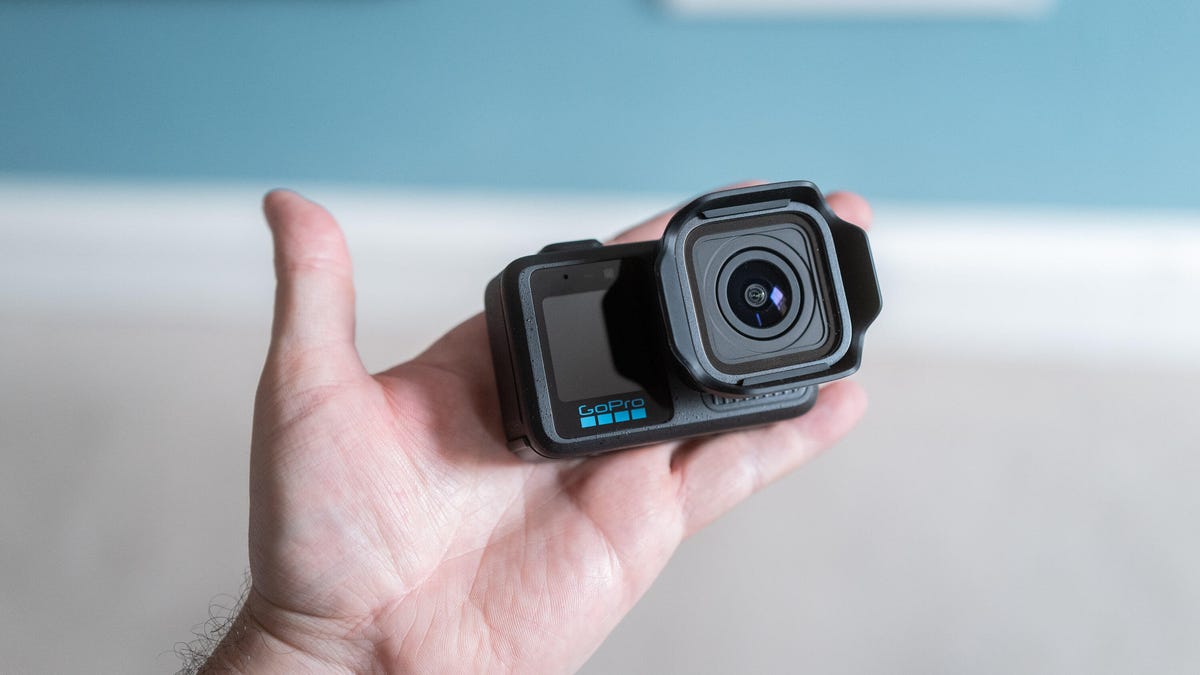
I’ve been using GoPro’s Mission 1 Pro action camera for a few weeks now. I’m not quite ready to slap a final verdict on it, but I’ve definitely learned a few things that are worth knowing if you’re considering buying one. I’ve tested a range of features, from the new slow-motion mode to shooting 50 megapixel stills, and it’s impressed in some ways — and left me wanting more in others.
But I’m not yet ready to give it a review score. The reason being that I’ve had a very early sample with unfinished software that isn’t representative of how it might work if you went and bought one. My first model even had a pre-production lens, which was changed on the second unit I received. So while there are some things I’ve been able to test, it’s not fair to the camera to base my review off what I’ve seen so far.
But here’s what I can tell you.
How much is the Mission 1 Pro?
The Mission 1 Pro is on sale now for $700. Then there’s the base Mission 1, which has the same large sensor and new processor of the Pro model but lacks the slow-motion skills. It costs $500. At the top of the range is the Mission 1 Pro ILS, which has the same specs as the model I’ve been testing but uses an interchangeable micro four thirds lens mount — a first for any GoPro.
The ILS model — due out later in the year — will also cost you $700. It’s the model I’m most excited about, but I’ll get into that later.
Taken in DNG raw and adjusted in Lightroom, the wide-angle lens of the camera allowed me to capture a lot in one shot.
Why is the Mission 1 Pro exciting?
The Mission 1 Pro’s got a new GP3 image processor and a larger 1-inch sensor. GoPro says it offers better dynamic range and low-light performance. More importantly, it offers an astonishing 960fps frame rate for slow-motion video and 8K open-gate recording, meaning it captures footage using the entire sensor.
Those are potent specs from a device that still fits in the palm of your hand and is fully waterproof, even without a dive case.
Is the Mission 1 Pro slow motion good?
On paper, very. It can shoot at an astonishing 960 frames per second, which is the sort of speed you’d normally only get from dedicated slow-motion cameras. But there are caveats. First, it’ll only capture this footage at full HD, so if you’re working on a 4K or 8K project, you’ll need to upscale that footage and you could potentially lose quality as a result.
The camera cage, grip and shutter button add a lot of bulk to the camera, but they do make it much more ergonomic when you’re out and about shooting away.
It also only shoots in short bursts of 10 seconds at a time, so you’ll need to get your timing right if you want an epic shot; you can’t simply leave it running for minutes and hope you get the shot. But I don’t think that’s a problem. It’s important to keep in mind that slowing 10 seconds of 960fps footage to a 30fps timeline results in roughly five minutes of slow-motion video.
My preferred slow motion is shooting at 240fps, which the camera can achieve at 4K resolution and in its Log color profile for better color grading in post production. That 240fps frame rate still offers an impressive 8x slow-motion effect when played back at 30fps and goes well beyond what even my professional Canon R5 or Blackmagic Cinema Camera 6K Pro can achieve.
What is the general Mission 1 Pro video quality like?
Here’s where I can’t really answer with any certainty. The footage I’ve shot so far has been hit and miss. I’ve found the auto white balance to be a bit unreliable, often producing slightly unnatural colors and forcing me instead to shoot using manual white balance — which, to be honest, I would probably want to do anyway to ensure consistent colors in a shot.
I also sometimes found the image processing went a bit too far in brightening shadows and saturating the color, resulting in more of an HDR look than I would have wanted. It’s why I’d rather shoot my footage mostly using in the 10-bit Log profile, which gives me more flexibility for adjusting my footage in post production.
I heavily edited this still image, taken in DNG raw. Apart from adjusting the white balance, as the auto settings looked very cool and magenta, I also brought the highlights down a touch. The footage looks good, although the wide lens’s fixed focus means I’m not quite sharp, as the focal plane is optimized more toward infinity.
Overall, image quality seems solid, though not noticeably better than the already excellent Hero 13 Pro it replaces. The biggest upgrades in this model appear to be aimed at those who want more advanced slow-mo capabilities.
That said, it’s important to remember that I’ve installed at least four firmware updates during my testing and only received the final production hardware a few days ago. I haven’t yet had the chance to re-test it in a wide range of scenarios. It’s certainly off to a good start, but whether it does enough to justify an upgrade from the previous model remains to be seen once I’ve spent more time shooting in both daylight and low-light conditions.
How about still images?
They’re fine, at least based on my tests so far. The super-wide angle lens means that fine details aren’t great, but if you’re into capturing those huge, sweeping vistas on your travels, then it’ll be fantastic. It shoots in DNG raw and my advice is to use it: Having manual control over the colors has been critical for me, as has the ability to pull back shadow and highlight detail in Adobe Lightroom.
This straight-out-camera photo, taken in JPEG with manual white balance, isn’t bad but I think it looked too over-processed, with shadows that have been artificially brightened too much, resulting in an HDR-style image.
By editing my DNG raw file, I was able to keep the shadows at a more realistic level, thereby maintaining the darker vibe I was going for. I love how the wide-angle lens allowed me to use these leaves as a natural frame for the waterfall.
What about battery life?
Again, it’s impossible to say with certainty at this point as the software updates will certainly play a big part in how energy efficient the camera is. However, the battery life from the new Enduro 2 battery already seems solid. Even after a long day out shooting footage on the levada walks on the stunning island of Madeira, I still got back to my lodgings with plenty of battery to spare.
What new accessories are there for the Mission 1 Pro?
There’s a new camera cage that comes with a detachable grip and a sort of shutter button that fits into the cold shoe slot. While it makes the usually very small camera a lot bigger, it also makes it easier to hold and operate more like a regular compact digital camera.
The new Enduro 2 battery should offer enough juice for a day of mixed shooting.
GoPro has also announced a set of wireless microphones which will natively work with the cameras without the need for external receivers — much like DJI does with its mics and Osmo cameras. I haven’t tried these yet, but for content creators and vloggers these will likely be a must buy.
What about the interchangeable lens Mission 1 Pro ILS?
This is the model I’m most excited about. While the specs on paper for the Mission 1 Pro are awesome — especially when it comes to slow motion — I’m generally not a fan of the super-wide angle, fixed-focus look achieved by “traditional” action cameras like this. Sure, they’re great if you want a big field of view when strapping one to your head and hurling yourself down a mountain on a bike, but GoPro cameras have never challenged traditional filmmaking.
But strap on a high quality micro four thirds lens from the likes of Panasonic, Olympus or Voigtlander and now you’ve got a proper setup capable of high-speed shooting at a range of focal lengths, adjustable focus and shallow depth of fields for cinematic bokeh –all from a camera body small enough to slip into your jacket pocket.
I’m genuinely excited about spending some real time with the Mission 1 Pro ILS and seeing whether GoPro can truly play in a more professional cinematography arena.
There’s still a screen on the front to help you frame up those selfies.
Should you buy the GoPro Mission 1 Pro?
I’m still in the early days of testing but I can say a few things with certainty. The 960fps slow-motion mode is an amazing headline, but its application is arguably quite niche. I struggled to even find things to shoot and was only really happy with a brief clip of a pigeon flapping its wings. Think hard about whether that sort of slow motion is really important to you, especially considering its limitations.
Beyond the slow-mo skills, the overall quality that I’ve seen so far isn’t leaps and bounds beyond what the company offers from its Hero 13 camera. So if you already have a recent GoPro and mostly use it to shoot at 4K at a standard 24, 30 or 60fps, then I don’t think you’ll see much benefit. But for those of you upgrading from a much older model — such as the Hero 7 — you’ll certainly see the boost in quality.
The real excitement will come when the ILS model arrives and we’re able to pair that larger image sensor and slow-motion skills with a professional-standard lens. Stay tuned for that.
Read the full article here